

Drone Controller Harness Support for Extended Flights
Could the controller’s position, not just its weight, make an extended flight more manageable? A drone controller harness uses adjustable support to hold the controller at mid-chest, helping distribute its weight across your chest and shoulders while keeping the display within a natural line of sight.
During long periods at the controls, posture, comfort and quick access to the controller all matter. A harness can help, but the fit and compatibility with your controller are key. It should feel balanced without obstructing the controls or your view of the flight area.
This guide explains how to assess harness fit, weight distribution and comfort for extended flights, along with controller access and compatibility. It also covers harnesses for smart controllers with integrated screens, so you can choose a setup suited to your equipment and work.
Key Takeaways
- Adjust the harness so its support sits comfortably across your chest and shoulders, rather than pulling unevenly on your neck.
- Position the controller for a clear display view while keeping the flight area in sight.
- Assess comfort over the length of your planned operation, including how easily you can reach and use the controls.
- Match the harness attachment to your controller: integrated-screen models and controllers with an inset nut use different configurations.
- Explore Fitek Gear harness options through Caswell Aviation Ltd when you want support suited to a smart controller.
Adjustable straps and weight distribution
An adjustable harness can distribute controller weight across your chest and shoulders instead of concentrating it in one place. Fitek Gear harnesses use adjustable straps to provide support and are designed for comfort. Fit still depends on your posture, clothing and controller position. A balanced setup should feel stable without restricting arm movement or making the display difficult to see.
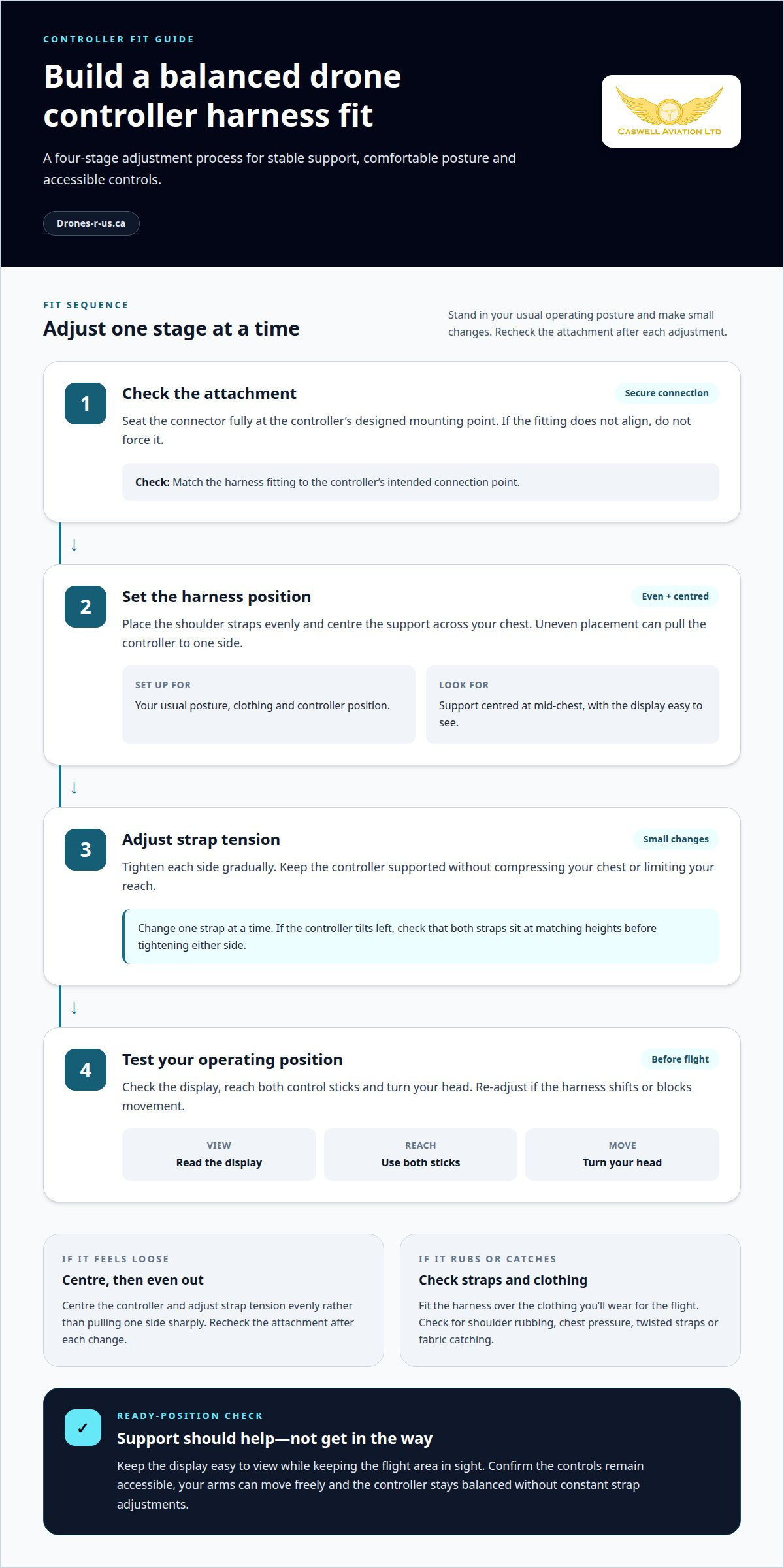
To attach and adjust a drone controller harness, match its fitting to the controller’s intended connection point. Secure the attachment, then adjust the straps while standing in your usual operating posture. Before flight, confirm the controller is supported, the controls are accessible and the straps don’t restrict movement.
Use this sequence to refine the fit:
- Check the attachment. Seat the connector fully at the controller’s designed mounting point. Avoid forcing a fitting that doesn’t align.
- Set the harness position. Place the shoulder straps evenly and centre the support across your chest. Uneven placement can pull the controller to one side.
- Adjust strap tension. Tighten each side gradually, keeping the controller supported without compressing your chest or limiting reach.
- Test the operating position. Look at the display, reach both control sticks and turn your head. Re-adjust if the harness shifts or blocks movement.
Make small adjustments, changing one strap at a time. If the controller tilts left, check that both straps sit at matching heights before tightening either side. If the harness feels loose when you move, centre the controller and adjust the strap tension evenly rather than pulling one side sharply. Recheck the attachment after each change. This makes it easier to identify whether the issue is strap placement, tension or the mounting point.
Breathable material can be useful during warm outdoor operations or when wearing several clothing layers. Fit the harness over the clothing you’ll wear for the flight, not just a thin shirt during setup. Check for rubbing at the shoulders and pressure where the straps meet your chest. If a strap twists, sits unevenly or catches on clothing, flatten or reposition it before operating.
Weight distribution affects more than comfort. A controller that hangs too low may prompt repeated downward glances, while one that isn’t centred can pull against a shoulder. Set the display at a height that’s easy to view, while keeping the operating area in sight. Practise looking at the screen, returning your gaze to the aircraft and reaching for the controls. A good fit supports these movements without constant strap adjustments.
Harness support for drone pilots
A harness holds the controller against your body, supporting a steady viewing position while freeing your hands when needed. Other options include a lanyard or chest mount. Compare how each supports the controller and whether it keeps the display, controls and flight area accessible.
Hands-Free Controller Support
Hands-free support means the harness carries the controller’s weight when you aren’t holding it. It doesn’t mean you can operate the aircraft without using the controls. During a brief task, such as repositioning equipment, a suspended controller stays close instead of needing to be set down. Check that it remains within reach and returns to a usable position without swinging into nearby gear.
A lanyard suspends a controller from a hanging strap. A chest mount places its support closer to the torso, while a harness uses straps across the body. Each option carries the controller differently and allows different amounts of movement. A pilot who needs to put the controller down briefly may prefer stable support, while one who changes stance may prioritize freedom of movement and access.
Test the setup before relying on it in flight. Stand in your usual operating position and release your grip while staying at the controls. See where the controller settles, then pick it up and reach both control sticks. If it swings, turns away from you or catches on clothing, adjust its position before beginning the operation.
Ergonomic Controller Support
Ergonomic support depends on where the controller sits and how its display aligns with your line of sight. Fitek Gear harnesses are designed to support a controller at mid-chest height and angle it for a natural view. Check whether that position lets you read the screen while keeping your head and shoulders comfortable during normal piloting movements.
A practical fit test is to alternate between viewing the display and looking toward the aircraft. Check whether the controller stays easy to reach, or whether you need to lean forward or draw your elbows inward. A centred position can keep it aligned with your body; poor alignment may cause you to twist or reach unevenly.
Ergonomics also means maintaining deliberate control. Confirm the harness doesn’t block buttons, cover the edge of the display or restrict thumb movement. Try the controls from your usual stance, then repeat while turning your head to scan the operating area. This check shows whether the support position suits your equipment and movements.
Choose support based on the task, not the label alone. A lanyard, chest mount and harness can each hold a controller differently, so compare stability, screen angle and access in your working posture. Pilots refining their broader setup can explore drone pilot resources alongside these fit considerations.
This check can help confirm that your position stays comfortable as you alternate between the display and the aircraft. The Fitek Gear Drone Controller Harness is designed to help pilots maintain a neutral posture and clear sightlines while controlling a UAV. Check the fit in your usual stance, keeping the display visible and your shoulders relaxed without compromising access to the controls.
Comfort during extended flights
Comfort needs to hold up through the actual length and posture of an operation. Some wildfire hotspot detection missions flown by UAV pilots last 12 hours or more. That example makes sustained controller support relevant: a setup that feels manageable before takeoff may create pressure or distraction over time. Consider the planned task, clothing and how often you’ll need to view the display.
Some controller straps can make pilots bend their necks sharply to see the display. This posture is associated with upper-back and neck pain sometimes called “Drone Pilot’s Neck”. A harness that places the controller higher and angles its screen toward you can reduce the need to look down sharply. The right position still depends on your height, stance and controller.
Assess comfort in your operating posture, not while standing casually. Wear the jacket or layers you expect to use, attach the controller, then look at its screen and toward the aircraft. Notice any pulling across your shoulders, pressure on your chest or repeated neck movement. If the screen sits below your natural sightline, adjust its position before judging the fit.
Check the fit with a short practice sequence: view the display, look back toward the aircraft, reach the controls, then relax your grip. Repeat while standing as you would during a mapping or inspection task. The harness should support the controller without pinning your arms or making you lean forward. If pressure builds in one area, assess strap placement and controller angle separately.
- Shoulder contact: Look for twisted straps or concentrated pressure near the neck.
- Screen position: Confirm the display is readable without a sharp downward bend.
- Movement: Turn your head and reach the controls without the controller catching on clothing.
- Changing layers: Reassess the fit over the outerwear used for the flight.
Comfort also depends on whether the controller stays usable as you change position. A screen that shifts when you turn can prompt repeated adjustments, while a stable viewing angle helps you focus on piloting. Test standing, turning and reaching before an extended operation. A harness supports the controller, but it doesn’t replace sound task planning or suitable breaks during long work periods.
For a 12-hour-or-longer mission, plan the controller setup around the full working posture, not just the first few minutes. Check that the screen stays easy to read, the controls remain accessible and the support doesn’t create a pressure point. These practical checks help identify fit problems before they become a distraction during flight.
Controller stability and accessibility
Stable support matters when you need to reach the controls promptly or change position. Assess how the controller sits, moves and remains accessible throughout the task.
Controller Stability and Access
A harness should keep the controller close enough for immediate access without requiring you to hold it continuously. Some mapping operations require pilots to remain ready to take manual control of the UAV to meet regulatory requirements. In that setting, test how quickly you can reach the sticks and whether the controller stays oriented toward you after you move.
A harness shouldn’t cover the controller’s antennas, screen or controls. Position the attachment so the display stays visible and your hands can reach the sticks, buttons and switches without catching on straps. Check antenna clearance in the controller’s normal operating position, then try your usual viewing and control movements.
Stability means controlled movement, not locking the controller in place. If you turn to check equipment, for example, you should be able to return to the display without untangling a strap. A suspended controller that swings or rotates can slow that transition. Adjust its position and attachment so it stays settled while remaining easy to lift and operate.
Use a practical access check before flight:
- Screen: Confirm the full display remains visible from your normal stance.
- Controls: Reach each frequently used control without moving the harness aside.
- Movement: Turn and reposition to see whether the controller swings or catches.
- Manual access: Pick up the controller and return both hands to the controls smoothly.
Compatibility with Straps and Mounts
Compatibility with a neck strap or tablet mount depends on the controller’s attachment points and the harness connection. A controller designed for a ¼-inch inset nut uses that fitting for its mount. Don’t assume a separate strap and harness can share the same point securely. A stacked connection may shift or obstruct access.
Tablet mounts add another fit consideration. A larger screen or bracket can change the controller’s balance, viewing angle and clearance around the controls. Test the complete assembly, not just the controller: support it in the harness and check that the tablet remains secure and readable.
Before operating, inspect how each attachment connects to the controller. Confirm that straps don’t cross the screen, cover buttons or press against antenna areas. If you also use a neck strap, check whether it pulls against the harness when you lift the controller. A stable arrangement lets you switch between supported and handheld use without snagging or losing access.
Smart Drone Controller Harness
A smart-controller harness is designed for a controller with an integrated display. That layout makes it important for the screen, attachment point and controls to work together. Match the harness configuration to your controller model before assessing how it sits against your body.
Integrated-screen controllers designed for this style of support include the DJI RC Pro, DJI Smart Controller, DJI RC Plus and ACSL TAITEN. Their built-in screens eliminate the need to position a separate phone or tablet, but the controller still needs a compatible mounting connection. Don’t rely on the model name alone: compare the actual attachment point with the harness fitting.
The Multi Drone configuration is designed for controllers with a ¼-inch inset nut. This identifies the mounting interface, not a universal fit for every smart controller. For example, distinguish the DJI RC Pro’s model-specific mounting arrangement from a controller that uses an inset nut. The attachment should seat correctly without covering buttons or pressing on the screen.
Use these checks to assess a smart-controller setup:
- Identify the controller: Match its complete model name, such as RC Plus or ACSL TAITEN, to the intended configuration.
- Inspect the mounting point: Check whether the controller uses the ¼-inch inset nut connection.
- Assess the display: Confirm the screen remains visible at the harness-supported angle.
- Reach the controls: Test the sticks and buttons with the controller mounted.
An integrated screen makes positioning especially important. If the controller hangs too low or angles away, you may need to change posture to read flight information. Mount it, take your usual operating stance and check screen visibility while looking toward the aircraft. Then reach the controls without shifting the attachment. This reveals whether the specific setup supports both viewing and operation.
Hand-launching and retrieval bring another consideration. A smart-controller harness is described as supporting pilots during these tasks. Treat it as a support feature, not a substitute for a controlled launch or retrieval procedure. Check that the controller stays supported and accessible while your hands perform the task. The setup shouldn’t obstruct your movement or interfere with retrieving the aircraft.
The practical takeaway is simple: choose by controller model and mounting interface, then assess screen angle, control access and movement together. To explore smart-controller harness options, consider how your controller’s connection and integrated display fit the configuration.
Caswell Aviation Ltd: Fitek Gear Drone Harnesses for Smart Controllers
Caswell Aviation Ltd offers Fitek Gear Drone Harnesses for Smart Controllers to support controller access during extended operations. Choose a configuration by matching your controller model and mounting point, then assess screen visibility, control access and fit in your usual operating posture.
Integrated-screen controllers such as the DJI RC Pro, Smart Controller, RC Plus and ACSL TAITEN, for example, use the Smart Drone Controller Harness configuration. The Multi Drone configuration is designed for controllers with a ¼-inch inset nut. These distinctions help narrow your choice before you assess the complete setup.
If you’re selecting a harness for your smart controller, contact Caswell Aviation Ltd to discuss your setup.
Prepare your controller setup for the next flight
Include controller support in your pre-flight planning, alongside the equipment and procedures your operation requires. Choose a drone controller harness suited to your controller and working style, and assess the complete setup before extended use. If you’re also working toward pilot certification or a flight review, Caswell Aviation Ltd offers online and in-person drone training and flight reviews.
Caswell Aviation Ltd offers Fitek Gear Drone Harnesses for Smart Controllers, Online Drone Courses and InPerson Training, Advanced & Level 1 Complex Flight Reviews, and Drone Aerial Photography and Video. These options serve different needs, from controller support to pilot training and aerial imaging.
When you’re ready to discuss your setup or explore a relevant service, start a conversation with Caswell Aviation Ltd. A considered next step can help you approach your upcoming flight with a setup suited to the work ahead.
Frequently Asked Questions
What is it?
A drone controller harness is wearable support that connects to a compatible controller and helps carry it against your body. It’s an accessory, not part of the aircraft or its control system. For example, you can use one to keep the controller with you as you move between work areas, rather than setting it down whenever you pause for another task.
What is a drone controller harness and what is it used for?
It’s a wearable mount that supports a drone controller during field operations. The harness doesn’t fly the aircraft or replace your control inputs; it changes how you carry and hold the controller. During an inspection, for example, you may need to move between viewing the controller and recording observations. The harness is part of your equipment setup, while flight decisions remain yours.
What are the best drone controller harnesses in Canada and how do they compare?
Fitek Gear offers harness options for different controllers. The Smart Drone Controller Harness is designed for integrated-screen models, while the Multi Drone Controller Harness is designed for controllers with a ¼-inch inset nut. Both support the controller in a position intended to provide a clearer, more natural view.
How much does a drone controller harness cost in Canada, including shipping and taxes?
Where can you buy a drone controller harness in Canada?
You can explore Fitek Gear harness options through Caswell Aviation Ltd.
Leave a comment