

DJI Smart Controller Harness in Canada: Fit, Support and Field Setup
What makes a harness suitable for your setup depends on more than the strap. Choosing a DJI smart controller harness Canada pilots can use starts with the exact controller model, attachment points, adjustment and access to the controls. If you notice discomfort or fatigue during longer sessions, assess how your controller is supported before heading into the field.
A harness should suit both your controller and your flying workflow. A secure attachment is only one part of the assessment: consider whether you can reach the controls comfortably, move naturally between tasks and manage your equipment during setup and pack-down. Adjust the arrangement on the ground so you can evaluate how it feels before flight.
This guide covers controller fit and attachment compatibility, ways to assess support and control access, and practical steps for setting up a harness. It also introduces Fitek Gear harnesses for smart controllers, available through Caswell Aviation Ltd, a Canadian retailer serving pilots nationally. Use these checks to make a considered choice for your equipment and the way you fly.
Key Takeaways
- Match your exact controller model to product-specific compatibility information. Similar design descriptions alone don’t establish fit.
- Compare attachment points, adjustment options and control access to assess how a harness may suit your setup.
- Before flying, identify your controller, fit the harness and follow its product-specific instructions to adjust and check the setup.
- Use your flying frequency and field routine to guide your choice of a DJI smart controller harness Canada pilots can consider.
- Explore Fitek Gear harnesses for smart controllers through Caswell Aviation Ltd, a Canadian retailer serving customers nationally.
DJI Smart Controller Harnesses: What They Do and When They Help
A controller harness is wearable support that helps hold a compatible drone controller while you operate it. Instead of carrying the controller’s weight entirely in your hands, you attach it to support worn on your body. You can still hold and guide the controller as needed while using the controls. The harness supports handling; it doesn’t operate the aircraft for you.
Harness designs vary. Some use a neck strap; others distribute support or connect to the controller differently. The word “harness” doesn’t tell you how a specific design attaches, sits or moves with you. Review the product’s actual construction and instructions. For background on the aircraft a controller is used to operate, see this overview of the Unmanned Aerial Vehicle (Drone).
Think of a harness as part of your working setup, not a universal accessory. Whether it suits you depends on its fit with your controller, its adjustability and whether it allows practical access to the controls during your task. Evaluate a DJI smart controller harness Canada pilots are considering on those specific points, rather than on the category name alone.
How a harness differs from a neck strap
A simple neck strap generally suspends the controller from a point around the neck. Other harness arrangements may use different attachment points or distribute support differently. These are design differences, not proof that one style suits every pilot. Look at how the actual product connects to the controller and sits when worn. Two products labelled “harness” may feel or function differently.
Pay attention to how the support interacts with your normal grip. You should be able to handle the controller as intended without the attachment getting in the way of your movements. A harness may be useful for one setup and unnecessary for another. It doesn’t remove strain for everyone or replace sound flying practices.
When a DJI Smart Controller harness may suit your workflow
Consider how long you typically operate, how demanding the task is and how often you pick up or reposition the controller. A frequent field operator working through longer sessions may value wearable support differently from an occasional user flying for a short period. Tasks that involve moving between operating positions can also affect whether a harness feels practical. Your comfort preference matters, and pilots may reasonably choose different arrangements.
Keep comfort decisions separate from safety requirements. A harness doesn’t change the operating rules that apply to a flight, and wearing one doesn’t make a flight safe by itself. Maintain a usable grip, clear access to the controls and attention to the aircraft and surroundings. If the support interferes with any of those, reconsider the setup before flying.
- Occasional use: Consider whether your usual controller handling works for the length and demands of your sessions.
- Frequent field use: Think about how wearable support fits into repeated setup, operation and repositioning throughout your work.
- Any use: Assess the actual attachment and controller fit, then check how the arrangement feels while you operate the controls.
The useful question isn’t whether every pilot needs a harness. It’s whether a particular design fits your controller and suits the way you work.
Controller Fit and Support: The Details to Evaluate Before Choosing
Assess a harness against the controller it will carry and the way you operate it. Start with the exact model name, then compare it with the product’s stated compatibility information. Don’t assume that a harness described for one DJI controller fits every DJI controller, or that similar names refer to the same device.
Check exact controller compatibility
Read the model name on your controller and compare it with the harness maker’s compatibility details. “DJI Smart Controller” is a specific name, not a catch-all for other DJI controllers with similar labels. Use your controller’s documentation to identify it accurately. DJI’s Smart Controller official page provides manufacturer information to help with identification. Match the exact name rather than relying on appearance or a general product description.
Use this comparison table to assess the details that affect real-world fit:
| Evaluation point | What to look for | Field check |
|---|---|---|
| Controller fit | Stated compatibility with the exact controller model. | Confirm the model name matches the product information. |
| Attachment points | How the harness connects to the controller and where support is applied. | Check that the attachment arrangement doesn’t obstruct your grip or normal handling. |
| Adjustment | Instructions for changing the fit or support position. | See whether you can position the controller comfortably for your working stance. |
| Control access | Whether the setup leaves the display and controls accessible. | Confirm you can see the screen and reach controls without the harness interfering. |
Assess support, adjustment and control access
Attach the controller according to the product instructions, then assess how it sits while you stand in your usual operating position. Notice whether it hangs to one side, tips forward or pulls against the attachment. The goal is a usable position, not a particular angle or a promise of perfect balance. If the controller shifts when you move naturally, account for that before relying on the setup in the field.
Screen visibility and control reach matter together. A position that keeps the display in view but makes a control awkward to reach may not suit your task. Check the screen from your normal stance, then move your hands across the controls as you would during operation. The support shouldn’t block your view or force an unfamiliar grip.
Comfort is personal. Clothing, posture, controller handling and task duration can all affect how a setup feels, so assess it while wearing what you expect to use in the field. When comparing a DJI smart controller harness Canada pilots may consider, weigh compatibility first, then adjustment and practical access. A design description alone doesn’t establish fit.
For selection context, explore Fitek Gear harnesses for smart controllers and compare the product information with your controller and workflow.
How to Compare DJI Smart Controller Harness Options for Canadian Pilots
Compare harness options against your equipment and routine, not broad claims about what a harness should do. Start with product-specific compatibility, then consider adjustment, access to controls and how often you’ll use the setup. This gives you a practical basis for choosing without relying on a design label or an unsupported ranking.
Separate what the product information states from what you can assess yourself. Compatibility is a stated product detail. How the controller sits, whether you can see the screen and how comfortable the arrangement feels are matters to assess in use. Keep those categories distinct as you weigh a DJI smart controller harness Canada option for your workflow.
Match the harness to your controller and task
First, match the controller’s exact name to the harness’s stated compatibility information. Similar-looking devices or familiar design descriptions aren’t evidence that a harness fits. Then consider your operating position: working from a fixed spot, walking between setup locations or repositioning during a task can each change how support works for you. A harness affects how you carry and handle the controller, not the drone’s flight capability.
Next, think about the conditions in which you’ll wear it. In Canada, pilots may dress in layers for outdoor work. A fit assessed over a light shirt may feel different over a jacket or other field clothing. Try the adjustment with the layers you expect to wear, and check that the controller remains in a usable position without restricting your movement. This is a personal fit check, not a product specification.
Judge claims against observable use
Descriptions such as “comfortable” or “ergonomic” don’t tell you how a specific arrangement will feel. Treat comfort as subjective and focus on what you can observe: does the controller stay where you can use it, can you see the display, and can you reach the controls without obstruction? Assess those points in the stance and clothing you expect in the field.
Frequency of use also matters. Someone who handles a controller occasionally may prioritize simple, familiar handling, while a frequent field operator may value an adjustment that works consistently across their usual tasks. Neither preference makes one design universally better. Compare options in the context of your own operation, and don’t treat claims about support as promises of reduced fatigue or improved performance.
- Confirm: The exact controller name appears in the product’s compatibility information.
- Consider: Your usual working position, task movements and clothing layers.
- Observe: Controller position, screen visibility and clear access to controls.
Use this comparison as one step in your harness selection process. A considered choice matches documented compatibility with your own field assessment, rather than assuming a particular style or description will suit every pilot.
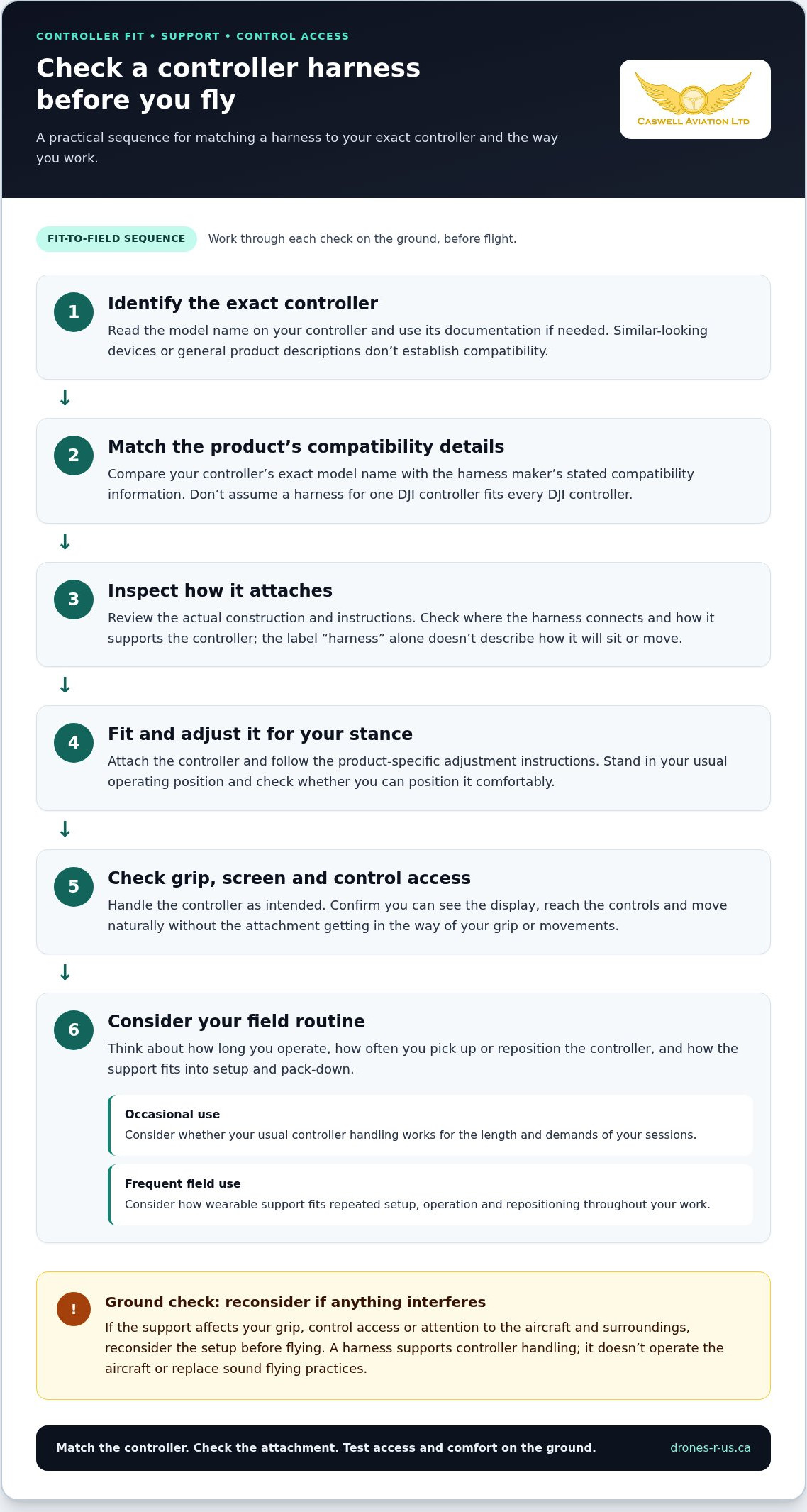
Set Up and Check a Controller Harness Before Flight
Make harness adjustment part of your ground setup, not something to work out while operating the aircraft. A stationary check lets you confirm that the controller is supported as intended and that the screen and controls remain accessible. Follow the harness maker’s instructions for attachment and adjustment, since connection methods can differ between designs.
- Identify the controller. Read its exact model name and match it to the harness’s stated compatibility information before attaching anything.
- Fit the harness. Secure the controller using the product-specific attachment instructions. Don’t improvise a connection or rely on appearance alone.
- Adjust the support. While standing still, follow the adjustment guidance and position the controller for your normal operating stance.
- Check access. Confirm that you can see the display, reach the controls and move the controller as your task requires. Correct any interference before flight.
Adjust the harness while stationary
Start with the controller secured according to its instructions. While stationary, make adjustments, look at the display from your usual working position and move your hands across the controls as you normally would. Check that the support holds the controller in a usable position without blocking your view or access. Notice how your posture feels, but treat comfort as an individual assessment, not a guaranteed result.
Recheck the setup as conditions change
Repeat the fit check if you change clothing layers or switch to another controller. A jacket can affect how the harness sits, and a different controller requires its own compatibility check. Confirm that the display remains visible, the controls are unobstructed and normal movement feels practical. If something shifts or interferes, pause and correct the setup before beginning the flight.
For a DJI smart controller harness Canada pilots plan to use in the field, consistency matters. Use the same sequence each time: identify, attach, adjust and check. This makes it easier to notice a change in fit before it becomes a distraction during operation. Keep the harness instructions available, particularly when setting up an unfamiliar arrangement.
Accessory setup is separate from the aircraft pre-flight process. A harness check doesn’t replace the aircraft, site or operational checks required for your flight. Complete those procedures independently and follow the applicable operating guidance. If the controller or harness setup draws your attention away from those preparations, stop and resolve the issue on the ground.
Once your checks are complete, explore Fitek Gear harnesses for smart controllers through Caswell Aviation Ltd and compare the product information with your controller and field workflow.
Explore Fitek Gear Harnesses for Smart Controllers Through Caswell Aviation
Caswell Aviation is a Canadian retailer of Fitek Gear harnesses designed for drone smart controllers. For pilots comparing a DJI smart controller harness Canada option, this is a product category to consider alongside your controller’s exact model, preferred fit and field routine.
Base your evaluation on product-specific information. A general description of a harness doesn’t establish compatibility with your controller, and a design that looks suitable isn’t proof that it will fit. Review the stated compatibility details and the particular product’s attachment and adjustment instructions. Then consider how its support arrangement may work with your operating stance, clothing layers and normal access to the display and controls.
What to keep in mind when considering Fitek Gear
Start with the controller name, not an assumption based on appearance or a similar model label. Compare that exact name with the harness’s stated compatibility information. Next, review the product’s setup guidance so you understand how it is intended to attach and be adjusted. These details help you assess how the harness relates to your equipment and how to set it up before use.
Think about your workflow, too. A pilot who works from a fixed position may assess support differently from someone who moves between operating locations. Consider how often you handle the controller and what clothing you typically wear. These are practical factors for judging whether an adjustment suits your routine, not claims that a particular design will guarantee comfort or improve performance.
Choose a practical next step
If you want to revisit the decision criteria, the drone harness selection guide can help organize your comparison around fit, adjustment and control access. Use it to identify what matters for your controller and work pattern, then compare those priorities with the information provided for the harness you’re considering.
For a focused review, keep a short list of questions for your own assessment: Does the stated compatibility match your controller? Can you follow the product’s attachment and adjustment instructions? Does the setup leave the display and controls accessible in your usual stance and clothing? Clear answers give you a more useful basis for consideration than broad design descriptions.
Explore Fitek Gear harnesses for smart controllers through Caswell Aviation and compare the product information with your equipment and field routine. A considered choice starts with documented fit and a setup that suits the way you work, without assuming a harness is right for every pilot.
Make Your Next Controller Setup a Considered One
Use your next field session to assess the setup under the conditions you actually work in. A harness decision isn’t complete at selection; how it sits with your clothing, stance and controller handling is part of the practical evaluation. Keep the product instructions close and make adjustments before the aircraft is in operation.
For pilots weighing a DJI smart controller harness Canada option, this measured approach helps turn a product choice into a setup suited to the work at hand. Compatibility comes from product-specific information; suitability comes from how the arrangement works for you. Let both guide your decision.
Caswell Aviation specializes in Fitek Gear harnesses designed for drone smart controllers and serves customers nationally across Canada. Explore Fitek Gear harnesses for drone smart controllers and compare the product information with your equipment and workflow.
Choose thoughtfully, then assess your setup on the ground before your next flight.
Frequently Asked Questions
Is a harness different from a neck strap?
Yes. Both can support a controller, but their construction and attachment arrangements can differ. A neck strap may suspend the controller from one point, while another design may use a different support arrangement. Compare the actual product instructions rather than relying on labels. Check how the controller is held, what adjustments are available and whether the setup suits your clothing and operating position.
Can I use one harness with any DJI controller?
No. Don’t assume one harness fits every DJI controller. Check the exact controller name against the harness’s stated compatibility information, then follow the product instructions for attachment. A harness description that names one model doesn’t establish fit with another, even if the devices look similar. Before use, confirm the controller is secured as instructed and that the attachment doesn’t obstruct your grip or access to the controls.
Can a controller harness improve flight accuracy?
A harness alone can’t guarantee more accurate flying. It changes how the controller is supported, but flight performance also depends on the pilot, aircraft, conditions and task. Treat claims about improved precision as claims, not assured results. During a stationary assessment, focus on practical observations: can you view the display, reach the controls naturally and keep your attention on the aircraft and operating environment?
How should I check a harness before flying?
Check it while stationary, before starting the flight. Follow the product instructions, then verify that the controller is attached as directed and that the screen and controls are accessible from your normal stance. If you change clothing or equipment, reassess the setup. A jacket, for example, may change where the support rests. Correct any interference on the ground, then complete your separate aircraft and operating checks.
Is the DJI Smart Controller the same as the DJI RC Pro?
No. DJI Smart Controller and DJI RC Pro are different product names, so don’t treat them as interchangeable when assessing harness compatibility. Read the name on your controller and compare it with the exact models stated in the harness information. A listing that names one controller doesn’t confirm compatibility with the other. This check is especially useful when comparing older equipment or discussing your setup with another pilot.
Do Canadian drone pilots need a harness?
A harness is a support accessory, not a pilot certificate or operating authorization. Whether it suits you depends on your controller, working style and comfort preferences. Using one doesn’t replace training or the operating requirements that apply to your flight in Canada. If you fly without a harness, your setup still needs to let you handle the controller and maintain attention to the aircraft and surrounding conditions.
How much weight can a DJI controller harness support?
There isn’t a universal capacity you can safely assume for all harnesses. Use only the load or compatibility specifications stated in the instructions for the particular product, if provided. Don’t infer capacity from the controller’s appearance or transfer a specification from another harness. If the product information doesn’t state a capacity, avoid adding accessories or relying on an assumed limit; follow its stated attachment and use guidance.
Leave a comment