

Drone Footage Editing for Client Review and Delivery
The edit isn’t finished when the footage looks polished; the client also needs a practical way to review and receive it. Editing drone footage for clients can include organizing clips, refining the selected shots, sharing a review copy for frame-by-frame feedback, and preparing the approved files for delivery. A few minutes of 4K footage can take up several gigabytes, so the delivery method matters as much as the edit itself.
It’s reasonable to expect a clear process for finding favourite moments and giving precise feedback without losing track of revisions. A review link can make it easier to comment on specific frames, while downloadable files can suit a final handover when the footage is ready to keep or use. The right approach depends on the project, the size of the files, and how the client wants to review them.
This article explains how professional editing, frame-by-frame review, favourite-moment selection, and delivery fit together. It also covers what affects the quality and cost of an edit, what to provide at the start, and when professional aerial photography and video support is the practical next step.
Key Takeaways
- Match the edit and playback format to how the finished footage will be reviewed and used.
- Choose a delivery method that can handle large video files and makes the final handover straightforward.
- Frame-specific feedback helps clarify requested changes and keep revisions focused.
- Organized footage and clear client selections help an editor identify the moments worth featuring.
- A defined workflow from brief to approval gives each stage of the editing process a clear purpose.
Video editing for aerial footage and other scenarios
Editing drone footage for clients starts with matching the footage, edit, and export to the intended use. Aerial projects may also combine video with flight information, while review copies need playback settings that work on the client’s device.
Fast editing and output for client projects
One-tap editing can assemble selected clips and apply a preset to create a quick draft for review. It cannot replace decisions about pacing, continuity, colour, or which moments best serve the project. An editor can refine the draft and prepare a review copy. Clients should consider whether a quick preview or a tailored final edit matters most.
For projects that need flight context, an editor can pair aerial video with a flight-path map. DJI SRT files recorded alongside MP4 footage contain per-frame GPS coordinates that can show the drone’s position. Aligning those coordinates with the video can help viewers understand where a particular shot was captured.
Preparing for a professional client workflow
Before work begins, the editor needs to know the project’s audience, purpose, preferred length, aspect ratio, and desired style. They can also ask which locations or clips matter, whether a map is needed, and which formats suit the intended use. These details shape the edit and define its scope.
In Canada, the written agreement should identify who owns copyright and what uses the client is licensed to make. Payment alone shouldn’t replace clear terms. For editing drone footage for clients, the agreement can also clarify the deadline, branding, music or narration needs, review process, and who approves the final version.
Editing costs depend on the project and are provided after a quote request. Footage volume, editing complexity, graphics, revisions, and delivery formats can affect the price. Clear details about intended use and expected outputs help define the work before editing starts.
Colour, stabilisation and quality checks
Professional colour correction balances exposure, contrast, and colour across shots, helping cuts between locations look consistent. Stabilisation can reduce unwanted camera movement, while cropping may improve the frame. The editor checks the result at its intended viewing size, since strong corrections can affect detail and composition.
Common mistakes include abrupt cuts, inconsistent colour, excessive sharpening, and exports that don’t play smoothly on the client’s device. Modern DJI and Autel drones record in 10-bit HEVC (H.265), which many browsers and media players cannot decode. For broad browser playback, footage may be transcoded to 8-bit H.264. This creates a playback copy, not a replacement for the camera original.
To preserve source footage, the professional keeps original files separate and exports recompressed copies for review or delivery. A few minutes of 4K drone footage can take up several gigabytes of storage. The editor can choose a transfer method and export format based on intended use, while retaining originals for later edits or alternate outputs.
Choosing a delivery method for professionally edited drone footage
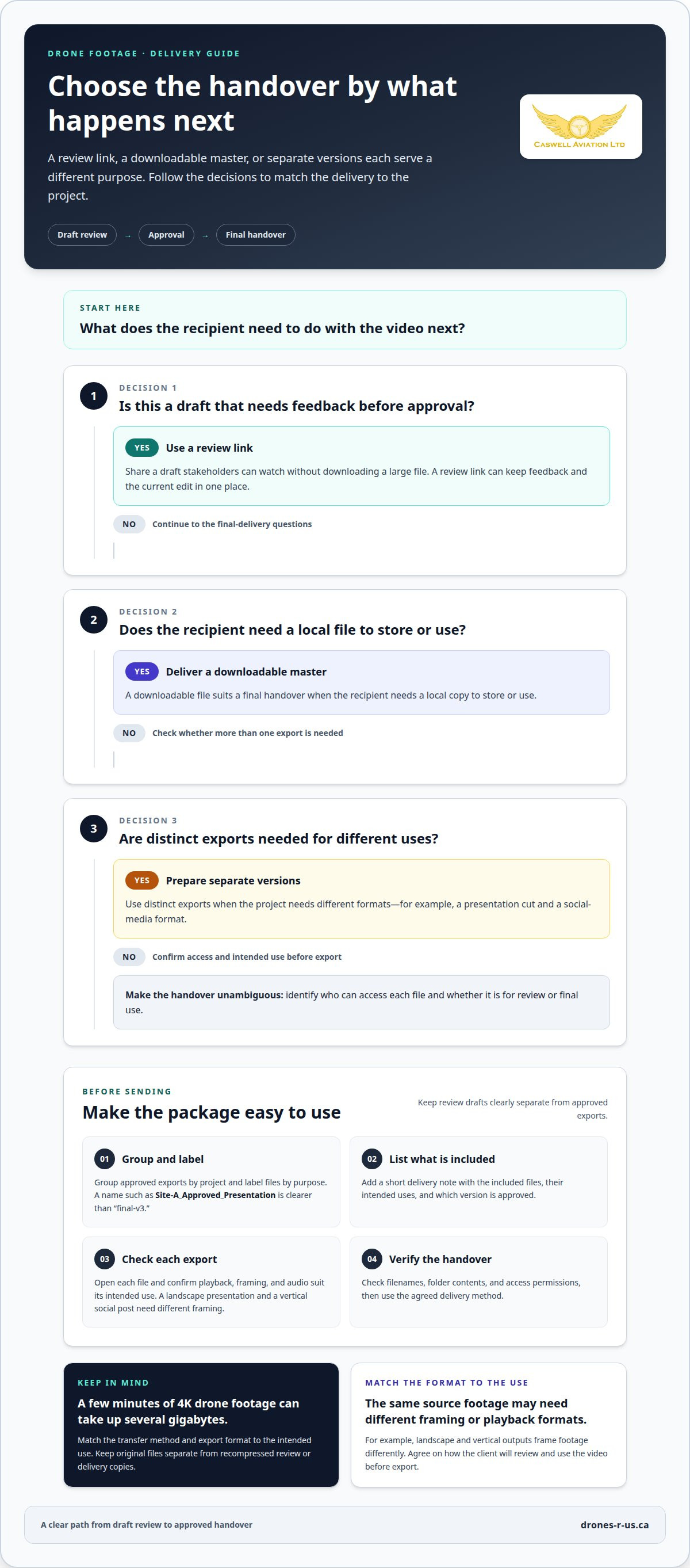
The best handover depends on who needs access, how they’ll review the edit, and where they’ll use it. A review copy shared through a viewing link serves a different purpose from a final file prepared for a presentation, website, or archive. Agreeing on these needs before export helps match the format and transfer method to the project.
For Canadian projects, drone regulations matter at the capture stage: the operation and location shape what must be planned before filming. Delivery choices concern file transfer and access, so they don’t replace compliance with applicable flight rules.
A cloud-based review link can let stakeholders watch a draft without downloading a large file. It can also keep feedback and the current edit in one place. For final delivery, downloadable files give the recipient a local copy for approved use. The handover should identify who can access each file and whether the link is for review or final use.
Consider these delivery options by purpose:
- Review link: Useful when a client needs to watch a draft and share comments before approval.
- Downloadable master: Suited to a final handover when the recipient needs a file to store or use.
- Separate versions: Helpful when a project needs distinct exports, such as a presentation cut and a social-media format.
A clear folder structure makes the handover easier to use. The editor can group approved exports by project, label each file by purpose, and separate final versions from review drafts. For example, “Site-A_Approved_Presentation” is more identifiable than “final-v3.” A short delivery note can list the included files, their intended uses, and which version is approved.
Before sending the package, the editor can open each export and confirm that playback, framing, and audio suit its intended use. A landscape presentation and a vertical social post need different framing, even when they use the same source footage. The editor should also check filenames, folder contents, and access permissions, then use the agreed delivery method. These steps help distinguish a draft from the approved master.
If you’re planning a project that needs new aerial footage as well as a clear handover, explore drone aerial photography and video. A defined use, audience, and review process help shape a practical delivery plan from the start.
Editing feedback and frame-accurate review
Frame-accurate review turns general reactions into specific edit instructions. A note such as “shorten the reveal” gives direction; a note attached to the exact frame shows where the change belongs. For a construction-site flyover, that could mean identifying when a building enters view and asking the editor to hold the shot longer.
A review copy should make the video easy to pause, replay, and comment on. The client can mark a timestamp, describe the issue, and state the desired change. For example, “At 00:00:12, trim the turn before the roofline” tells the editor both where to look and what to adjust. If the request concerns a particular frame, the reviewer can step through the image and add a frame-specific marker.
Useful feedback describes the result, not just a preference. “Make this smoother” leaves the editor guessing; “reduce the visible jolt as the camera turns left” identifies the problem. Notes can distinguish required corrections from optional preferences, helping the editor prioritize a missed landmark, an abrupt cut, or a title that stays onscreen too briefly.
- Identify the moment: Include the timestamp or frame marker and a short description.
- State the change: Request a trim, alternate shot, title adjustment, or pacing change.
- Explain the priority: Mark essential corrections separately from stylistic preferences.
- Consolidate comments: Gather stakeholder notes into one set before sending revisions.
Professional editors manage revisions by recording the agreed scope, deliverables, review stages, revision terms, and approval method in the project agreement. Clear terms define how feedback is submitted, what counts as approval, and how changes outside the agreed scope are handled. Final approval should identify the accepted version, not simply say the video looks good.
One consolidated review is usually more actionable than scattered messages from several stakeholders. If a project lead requests a tighter cut while another reviewer wants to retain a full establishing shot, the editor needs a decision about which direction takes priority. A named approver can resolve conflicting notes and send one ordered response.
After making changes, the editor can provide a new review version with an updated version label. Reviewers should direct any remaining comments to that version, rather than mixing notes from earlier exports. A final playback checks the requested edits, titles, transitions, and audio together. The approval record can then note the exact filename and version accepted for delivery.
This process keeps feedback tied to visible moments and recorded decisions. For example, a note about a horizon adjustment can point to the affected shot, while the approval record identifies the final export. Specific comments and version labels help prevent an old draft from being mistaken for the approved video.
How professionals help clients select favourite moments from drone footage
Favourite moments are easier to identify when the editor presents footage in an organized review reel. Instead of sorting through camera files, clients can compare clips by location, movement, or subject. For example, a shoreline project might group a wide establishing view, a low pass along the water, and a closing pull-away. This structure makes each shot’s purpose easier to judge.
The editor can create a contact sheet or shot list with a thumbnail, clip name, and brief description. A label such as “north entrance, rising reveal” gives the client more context than a camera filename. The client can mark selections as essential, optional, or unsuitable. These categories help distinguish the shots needed to tell the story from attractive extras.
Clear preferences guide the edit without requiring the client to choose every cut. A client might favour a smooth approach to a building, while the editor notices that a later orbit shows the site more clearly. The editor can use the preferred moment as a reference, then select supporting footage that improves the sequence and maintains a logical visual flow.
- Identify the subject: Name the building, landscape, person, or feature that should appear.
- Describe the action: Note whether the preferred shot rises, tracks, or pulls away.
- Set priority: Mark must-use footage separately from alternative options.
- Explain the purpose: Say whether a moment should establish a location, show a detail, or close the video.
For a property project, the client may select an approach shot that reveals the main entrance. The editor can pair it with a wider view of the surrounding site, then use a detail shot to emphasize a feature. The selection isn’t simply the most dramatic image. Each shot should serve the project’s audience and connect naturally with the others.
When several clips show the same subject, the editor can compare their framing, movement, and visual clarity. A steady pass may work better for a presentation, while a faster reveal may suit a short promotional cut. The editor can also flag footage that looks appealing on its own but creates an awkward transition or repeats information already shown.
A concise selection list gives the editor direction while leaving room for professional judgement. For instance, a note can mark “north entrance” as essential and “parking-area orbit” as optional. The editor can build the sequence around these priorities, check how each chosen moment connects, and return the cut for review. This approach turns favourite shots into a coherent project rather than a collection of unrelated clips.
Professional workflow for editing client drone footage
A professional workflow moves from file intake to an approved master through defined stages. For a shoreline video, that means organizing flight folders, identifying the intended audience, shaping a sequence, and preparing files for review and delivery.
- Receive and organize the footage. The editor records the supplied folders, checks filenames, and groups clips by flight, location, or subject. A folder labelled “north shoreline” can keep its related passes together. The editor also notes missing or unreadable files before building the sequence.
- Review the brief and define the deliverable. The editor confirms the video’s purpose, audience, preferred format, and intended use. A tourism promotion may need a different pace from a shoreline inspection. The brief also identifies required locations, brand elements, and any moments the client considers essential.
- Inspect and select usable clips. The editor reviews the footage for framing, movement, exposure, and continuity. A smooth approach shot may establish the location, while a second pass may show a relevant detail. The editor logs promising clips and excludes footage that does not support the brief.
- Assemble and refine the edit. Selected shots are arranged into a sequence with a clear opening, progression, and close. The editor adjusts timing, transitions, colour, and stabilization to suit the project. For example, a shoreline sequence can move from a wide view to a closer feature, then return to the broader setting.
- Prepare review, approval, and delivery. The editor exports a review version and gathers feedback through the agreed process. After approved changes, the editor checks the final file, labels it clearly, and delivers the agreed formats. A delivery note can identify the approved master and distinguish it from earlier drafts.
File intake is also the time to resolve practical questions. If footage arrives in separate folders, the editor can preserve that structure or reorganize it by location. A note identifying “north shoreline” as the priority helps connect the brief to the correct clips. The editor records decisions so the sequence reflects the agreed objective.
Project scope shapes each stage. A short promotional cut may focus on a few strong shots, while a broader project may need more locations and graphics. The editor considers footage volume, requested outputs, review needs, and revision scope when planning the work. Those factors also inform a quote request, rather than relying on a generic rate.
Before final handover, the editor plays the exported file from start to finish. That final pass can reveal a missed title, an abrupt cut, or an export that differs from the approved edit. For support with an aerial video project, discuss your drone footage project.
Caswell Aviation
Caswell Aviation Ltd. is a practical next step when a project needs aerial footage captured as well as a clear plan for its final use. Its Drone Aerial Photography and Video service supports projects that still need footage, while the audience, intended use, and delivery format can guide editing expectations. This distinction helps clients decide whether they need new imagery, post-production, or both.
For pilots developing their qualifications, Caswell Aviation Ltd. also offers Online Drone Courses and InPerson Training, along with Advanced & Level 1 Complex Flight Reviews. These offerings address flight training and review needs rather than replacing an editing brief. If you’re planning a project involving aerial imagery, contact Caswell Aviation Ltd. to discuss the next step.
Set your next edit up for success
Before editing drone footage for clients begins, define what the finished video needs to do. A project introducing a location may call for a different pace and sequence than one documenting a specific feature. That purpose gives the editor a clear basis for selecting shots, shaping the story, and preparing a useful final version.
Your next step can be a concise brief identifying the intended audience, the video’s use, essential moments, and who will approve the edit. If you still need aerial footage, consider how the capture plan should support that purpose. Clear priorities connect the footage, editing decisions, and delivery to the result you need.
Caswell Aviation also offers drone aerial photography and video, alongside training and flight reviews for pilots. If you’re ready to discuss what your project needs, contact Caswell Aviation about editing. A clear starting point can make your next aerial video project easier to plan.
Frequently Asked Questions
What video editing software do professionals use for client drone footage?
Professional editors use non-linear editing software, such as Adobe Premiere Pro, DaVinci Resolve, or Final Cut Pro. The choice depends on the editor’s workflow and project needs, including colour work, audio, titles, and delivery formats. Clients generally don’t need to use the same program. An editor can receive camera originals, complete the edit in their preferred software, and provide the agreed finished files.
What file formats, codecs, and settings should clients provide for drone footage editing?
Send the original camera files whenever possible, rather than files already compressed for social media. Include available notes about resolution, frame rate, codec, and colour profile, since these help the editor interpret the footage. For example, log or flat-profile footage may need a different colour workflow from an image ready to view. Keep filenames and related sidecar files together when transferring footage.
How do professional editors deliver, store and back up finished drone videos for clients?
Editors deliver finished videos using the agreed transfer method and organize them with clear project names and version labels. A useful handover separates final exports from working or review files, making the approved master easy to identify. The project agreement should define storage and backup arrangements, including who keeps the source footage and how the client receives a copy. Clients should retain the delivered master in their own records.
Leave a comment