

Drone Battery Care and Maintenance: 2026 Practical Guide
A fully charged drone battery isn’t necessarily ready to store. If you’ve found conflicting advice about whether to leave batteries full, partly charged, or nearly empty, you’re not alone. Effective drone battery care and maintenance depends on the battery and aircraft model, so one charge percentage isn’t a reliable rule for every operator.
That uncertainty matters when Canadian temperatures shift from winter cold to summer heat, or when a battery starts showing signs of age. A consistent routine can help you care for your batteries and recognize conditions that mean a pack shouldn’t be used.
This guide explains how to check, charge, store, and transport drone batteries, what to look for before and after a flight, and when to take a battery out of service. It also covers cold-weather planning and why the manufacturer’s instructions should take priority over generic advice.
Key Takeaways
- Base drone battery care and maintenance on your battery’s chemistry and the manufacturer’s instructions, not a universal charge percentage.
- Use approved charging equipment, follow the stated temperature limits, and let batteries cool after use before charging or storing them.
- Know which signs call for a manual check and which mean taking a battery out of service.
- Use a consistent flight-cycle checklist to inspect, operate, cool, and store each battery.
- Plan for Canadian weather using your battery’s operating limits, rather than assuming one temperature rule applies to every model.
Drone battery care and maintenance starts with knowing your battery
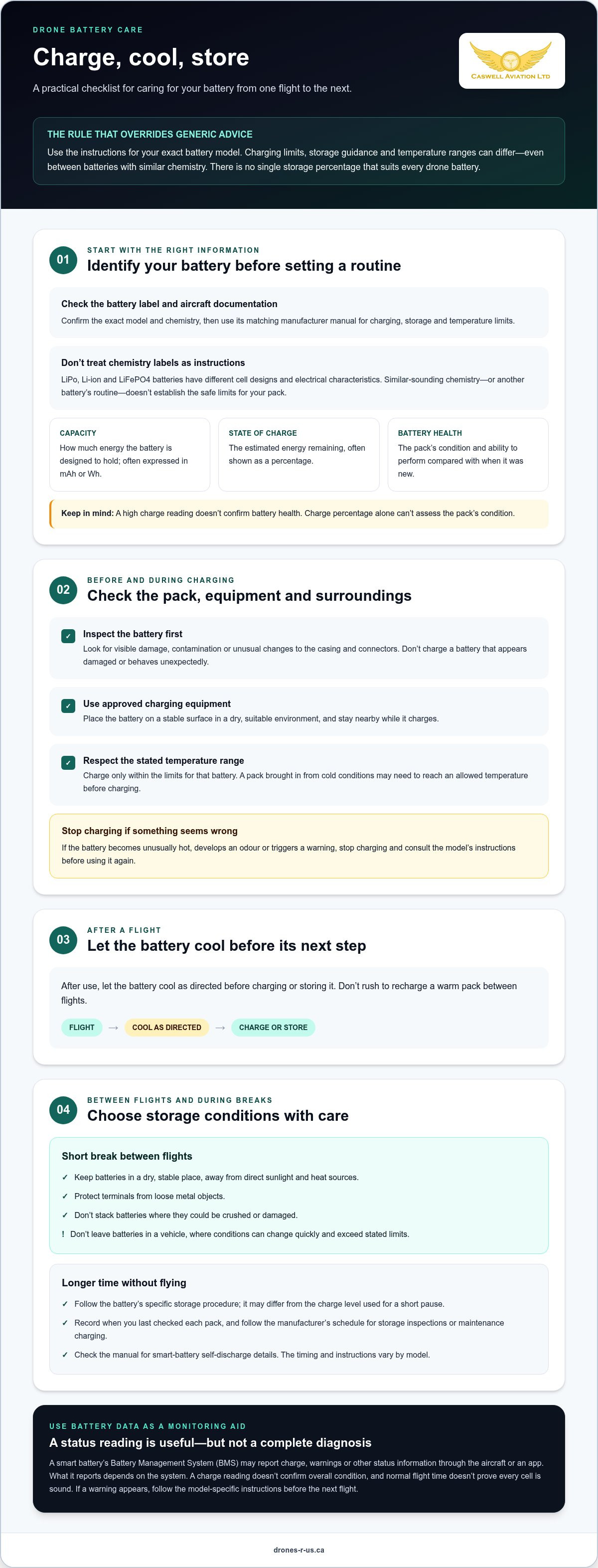
Drone battery care and maintenance involves four connected tasks: inspecting the pack, charging it correctly, storing it under suitable conditions, and monitoring its condition over time. Start by identifying the exact battery model and chemistry on its label or in the aircraft documentation. Then use the matching manufacturer manual for charging, storage, and temperature limits. Advice for one brand or model may not apply to another.
Three terms are easy to confuse. Capacity describes how much energy a battery is designed to hold, usually expressed in milliampere-hours (mAh) or watt-hours (Wh). State of charge is the estimated energy remaining, often shown as a percentage. Battery health refers to the pack’s condition and ability to perform compared with when it was new. A battery can show a high charge while having reduced capacity or a fault, so the displayed percentage alone doesn’t assess its health.
Chemistry also matters. LiPo, Li-ion, and LiFePO4 batteries differ in cell design and electrical characteristics, which can affect suitable charging and operating limits. LiFePO4 is a lithium-ion chemistry, while “LiPo” commonly describes lithium-polymer batteries used in many hobby applications. These labels aren’t interchangeable instructions. For background on the broader technology, see Lithium-ion battery technology, then follow the manual for the specific battery in your aircraft.
There is no single storage percentage that is right for every drone battery. Use the storage guidance for the exact model you own. Generic percentage ranges can mislead when separated from the battery’s design, onboard controls, and manufacturer guidance. Record the model and keep its care instructions with your operating notes.
How drone battery types affect maintenance
LiPo, Li-ion, and LiFePO4 labels provide useful context, but they don’t tell you every safe limit. Even batteries with similar chemistry can have different charge requirements, storage recommendations, and temperature ranges. Check the battery label and aircraft documentation for the exact model, then follow the manufacturer’s instructions for charging, storage, and use. Don’t transfer a routine from another battery just because its chemistry sounds similar.
What smart-battery data can and cannot tell you
A smart battery’s Battery Management System (BMS) may report state of charge, warnings, or other status information through the aircraft or an app. The information available depends on the system. Treat it as useful monitoring, not a complete diagnosis: a charge reading doesn’t confirm overall condition, and a normal flight time doesn’t prove every cell is sound. If a warning appears, follow the model-specific instructions before the next flight rather than dismissing it or relying on a generic reset.
Charging and storing drone batteries without avoidable wear
A reliable routine has three stages: charge with the correct equipment, let the battery cool after flight, then store it according to its model-specific instructions. Keep the manual available because charge limits and permitted temperatures vary between models. A familiar percentage or routine from another drone isn’t a substitute for the instructions supplied for your battery.
Manufacturer instructions take precedence over generic charge targets because storage and charging limits vary by battery model. Apply general safety practices consistently, but use the manual for the exact settings and limits.
A safe charging routine between flights
Before connecting a battery, inspect its casing and connectors for visible damage, contamination, or unusual changes. Use the manufacturer-approved charging equipment and place the battery on a stable surface in a dry, suitable environment. Stay nearby while it charges. If it becomes unusually hot, develops an odour, or triggers a warning, stop charging and consult the model’s instructions before using it again.
- Check first: Don’t charge a battery that appears damaged or behaves unexpectedly.
- Respect temperature limits: Charge only within the range stated for that battery. A battery brought in from cold conditions may need to reach an allowed temperature before charging.
- Allow cooling: After a flight, let the battery cool as directed before charging. Don’t rush to recharge a warm pack between flights.
These steps align with the practical inspection and temperature guidance in the AOPA Drone Battery Management Tips. The battery maker’s limits remain the reference for your equipment.
Storage during short breaks and long periods without flying
For a brief break between flights, keep batteries in a dry, stable place away from direct sunlight and heat sources. Don’t leave them in a vehicle, where conditions can change quickly and exceed the battery’s stated limits. Protect the terminals from loose metal objects, and don’t stack batteries where they could be crushed or damaged.
Longer periods without flying call for the battery’s specific storage procedure, which may differ from the charge level used for a short pause. Some smart batteries can self-discharge after a period of inactivity, but timing and instructions vary. Check the manual rather than assuming the feature works the same way across models. Record when you last checked each pack and follow the manufacturer’s schedule for storage inspections or maintenance charging.
Good battery habits support disciplined flight practices. Structured drone training can also help pilots build those habits, as described in structured drone training.
How to assess drone battery condition and separate risk from routine ageing
Assess a battery through consistent observations, not one clue in isolation. A shorter flight may reflect cold weather, a heavier payload, flight style, or other operating conditions rather than battery failure. A battery that looks normal can still trigger a warning or show an unexpected change in performance. Consider aircraft status information and the battery manufacturer’s guidance alongside a physical inspection.
The comparison below can help you sort observations into practical next steps. It isn’t a diagnosis. If a sign is unclear, stop and consult the manual before deciding whether the battery is safe to use.
| What you observe | How to interpret it | What to do |
|---|---|---|
| Gradually shorter flight time across repeated flights, with no physical damage or warnings | Could reflect routine ageing, but conditions such as cold, payload, or flight style can also affect endurance. | Compare performance under similar conditions and review the model’s battery-status information and guidance. |
| Repeated alerts, an abrupt charge change, or an unexpected performance drop | A warning or change that needs model-specific interpretation. One reading alone may not explain the cause. | Check the manual and follow its instructions before the next flight or charge. |
| Swelling, leakage, cracked casing, exposed wiring, unusual odour, or abnormal heat | Visible damage or an abnormal condition that can make the battery unsafe. | Stop using it. Don’t charge, fly, open, repair, or test it yourself. Follow the manufacturer’s disposal guidance. |
Battery warning signs that call for action
Take a conservative approach to physical warning signs. Swelling, leaking fluid, a cracked casing, exposed wires, unusual odour, or abnormal heat are reasons to stop using the battery, not to see whether it can complete one more flight. Don’t connect a damaged pack to a charger or attempt a home repair. Keep it out of service and follow the manufacturer’s instructions for safe handling and disposal. In Canada, damaged batteries shouldn’t go in household garbage; consult your local municipal waste depot about safe drop-off.
Repeated aircraft or app alerts also deserve attention, even when the battery looks intact. Record the warning and check the manual for its meaning and required response. If the charge display changes abruptly or a warning returns, don’t dismiss it based on one apparently normal flight.
When performance changes may reflect age or operating conditions
Flight time varies with conditions. Cold can affect battery performance, while a heavier payload or a more demanding flight style can use energy differently. To assess a change, compare the same battery on similar flights with comparable conditions, rather than drawing a conclusion from one short sortie or comparing different batteries used in different weather.
Routine ageing is more plausible when reduced performance develops gradually and there are no physical warning signs, but appearance and flight time alone can’t confirm battery health. If the change persists, is unexplained, or is accompanied by alerts, follow the manufacturer’s assessment guidance or seek qualified service advice. Careful observation is a key part of drone battery care and maintenance, but safety warnings take priority over attempts to extend a battery’s use.
A practical drone battery checklist for every flight cycle
A repeatable process makes battery decisions easier before, during, and after a flight. Keep the aircraft and battery manuals with your operating notes, and use them to set the charge, temperature, and operating limits for each model. This checklist provides a workflow, not substitute limits. Follow the instructions for the battery you’re using, especially when conditions change.
Inspect, operate within limits, cool, and store. Repeat this routine through every flight cycle.
Before and during a flight
Complete these checks before installing a battery. If you find damage or a warning you can’t interpret, don’t proceed based on guesswork. During flight, monitor aircraft indications and changing conditions, and make a conservative decision if performance or warnings raise concern.
- Identify the pack. Confirm you have the correct battery for the aircraft and know which model-specific instructions apply.
- Inspect the exterior and contacts. Look for swelling, cracks, leaks, exposed wiring, or damaged or contaminated contacts. Stop using a battery with visible damage.
- Review charge and status. Check the displayed charge and any battery or aircraft warnings. Treat an alert as a prompt to follow the manual, not something to dismiss because the battery looks normal.
- Check temperature and conditions. Confirm the battery is within its manufacturer-stated operating range. Consider the aircraft’s operating limits and current conditions when deciding whether to launch and how conservatively to operate.
After a flight and before the next one
Close the loop after landing. A brief record helps you spot patterns across flights and avoids relying on memory, especially when you use multiple packs. Don’t charge, store, or return a battery to service until its condition and required handling are clear.
- Review the pack after use. Note unusual heat, warnings, abrupt charge changes, visible damage, or unexpected performance. Remove a damaged battery from service.
- Let it cool. Follow the manufacturer’s cooling guidance before charging or placing the battery into storage.
- Prepare it for storage. Return it to the charge condition specified in its manual, then keep it in a dry, stable location away from direct sunlight and vehicles.
- Log the check. Record the battery model, date, warnings, storage checks, and observed changes. If something is unusual, note the conditions, such as cold weather or a different payload, so you can compare like with like.
A simple paper or digital log is enough. Use a line for each battery and flight cycle to note the date, model, warning or status, storage check, and any change you want to watch. Follow the manual for when to check again; don’t impose one schedule on every battery. A record also gives you clearer information to use with manufacturer guidance if a warning or performance change persists.
Consistent records and model-specific routines make drone battery care and maintenance a practical part of flight preparation. Broader operating habits are also covered in drone training options.
Canadian operating conditions and the next step in responsible battery care
Canadian pilots may use the same aircraft through very different seasons, but batteries don’t all tolerate the same temperatures. Cold can affect battery use, while heat during storage or transport can also create unsuitable conditions. Plan around the limits for your specific aircraft and battery instead of relying on one temperature rule for Canada. The manufacturer’s manual is the reference for deciding when a battery can be charged, stored, transported, or used.
Planning for changing weather and transport
Before a flight in cold weather, review the battery and aircraft operating limits and consider whether the pack is within its permitted range. Allow time to handle the battery according to the manual before use or charging. Protect it from temperature extremes while travelling to and from the flight site, and avoid leaving it in a vehicle where conditions may become unsuitable.
- Before departure: Check the forecast and compare expected conditions with the limits stated for your equipment.
- At the flight site: Follow model-specific guidance for preparing and using a battery in cold conditions. Don’t assume a routine for one aircraft applies to another.
- After flying: Plan charging and storage for a dry, stable location that stays within the battery’s stated limits.
If you’re travelling by air with lithium batteries—whether for your aircraft, cameras, or wireless headphones—check current airline rules and Canadian transport requirements before departure. Requirements can depend on the battery and how it is carried, so don’t rely on an old travel checklist or apply one set of limits to every battery. Confirm the applicable instructions for your trip and pack accordingly.
Building disciplined drone operating habits
Battery checks are one part of pre-flight preparation, not a replacement for broader operational knowledge. Include battery condition and temperature in your routine alongside aircraft checks, weather, planned flight conditions, and any operating limits relevant to the flight. A written procedure makes checks repeatable, while a log can help you notice a change that deserves attention.
Use the battery manual to guide decisions when conditions shift, such as a sudden temperature drop between planning and launch. If the battery falls outside its permitted range or shows a warning, pause and follow the manufacturer’s instructions rather than pressing ahead. This approach keeps care model-specific while giving you a consistent way to plan.
Caswell Aviation Ltd provides online drone courses and optional in-person training for pilots developing their knowledge and flight practices. Keep your battery routine in writing, review it against the manuals for your equipment, and find course details through drone training options.
Make your battery routine part of every flight plan
Choose one practical next step: turn your model’s battery instructions into a short routine you can follow before and after each flight. Keep it with your operating notes and update it when you change aircraft, battery, or seasonal plans. Consistent drone battery care and maintenance comes from applying the right guidance each time, not trying to remember conflicting rules from different sources.
Battery decisions also sit within a wider set of piloting responsibilities. Caswell Aviation’s Online Basic and Advanced Drone Course Package includes 8 video modules and 8 corresponding PDFs, with access limited to 1 year from the date of online access.
Explore drone training options and take a considered next step towards more confident, disciplined flying.
Frequently Asked Questions
Can I leave a drone battery installed in the aircraft between flights?
For a short pause, you may be able to leave it installed if the aircraft is powered off and the manual permits it. Before putting the drone away or transporting it, check the manufacturer’s instructions. Removing the battery can reduce the chance of accidental activation and makes it easier to inspect the pack separately. Don’t leave a battery installed in a powered aircraft or unattended equipment.
Is it safe to charge a drone battery unattended?
No. Stay nearby while a battery charges so you can respond if it becomes unusually hot, gives off an odour, or the charger displays a warning. Place the charger and battery on a stable, clear surface, away from materials that could catch fire. If you need to leave, stop charging as directed by the manufacturer and resume when you can supervise it.
Can cold weather damage a drone battery?
Cold can reduce available battery performance, and using or charging a pack outside its stated limits may cause problems. For example, a battery kept in a cold vehicle overnight may not be ready for immediate use or charging indoors. Follow the aircraft and battery manuals for temperature limits and preparation. If a pack is colder than permitted, wait until it reaches an allowed condition before proceeding.
What should I do if my drone battery is swollen?
Stop using it. Don’t charge, fly, press, puncture, open, or attempt to repair a swollen battery. Keep it away from household waste and follow the manufacturer’s handling instructions. In Canada, contact your local municipal waste depot about safe drop-off for a damaged battery. If the battery is hot, leaking, or producing an odour, avoid handling it and follow local emergency guidance if there’s an immediate hazard.
How often should I charge a drone battery that is in storage?
There isn’t one interval that applies to every battery. Some smart batteries adjust their charge after inactivity, while others require a different storage routine. Check the manual for the model’s self-discharge behaviour and inspection guidance. Add the date and storage condition to your battery log, then use the manufacturer’s schedule to decide when to check again. Don’t recharge on an arbitrary calendar cycle.
Can I use a third-party charger for my drone battery?
Use a third-party charger only if the aircraft or battery manufacturer explicitly approves it for that exact battery. A connector that fits doesn’t establish electrical compatibility or safe charging behaviour. Check the charger’s model and the battery instructions before connecting them. If the manufacturer’s documentation doesn’t make approval or compatibility clear, use the specified charging equipment instead of experimenting with an alternative.
Do I need to fully discharge a drone battery before recharging it?
No. Don’t deliberately run a battery down to empty unless the manufacturer specifically instructs you to do so for a defined procedure. A drone landing because the battery is nearly depleted isn’t a required step before each recharge. Follow the battery’s normal charging guidance and aircraft warnings. Avoid pushing a flight to an unnecessarily low charge just to complete a full discharge cycle.
Leave a comment