

Common Drone Videography Mistakes to Avoid: A Practical Checklist
What separates shaky, repetitive footage from a deliberate aerial sequence? Often, it comes down to a few decisions made before takeoff. The common drone videography mistakes to avoid often start with rushing: launching without a shot plan, changing camera settings mid-flight or trying to manage too many controls at once.
If your footage looks inconsistent, you’re not alone. Smooth video takes more than careful stick movements. Exposure, shutter speed, composition, flight pace and shot order all shape the result. A simple, repeatable process can help you focus on safe flying while capturing footage with a clear visual purpose.
This practical checklist covers planning, camera setup, controlled movements and post-flight review. You’ll learn how to reduce avoidable camera and workflow errors, capture a wider range of shots and find useful lessons in each flight. Work through the steps from pre-flight preparation to editing to make your next shoot more consistent and leave fewer decisions to make in the air.
Key Takeaways
- Identify choices that weaken footage, from distracting framing to clips without a clear purpose.
- Compare automatic and manual exposure to choose settings that suit the light and keep a sequence consistent.
- Match each flight movement to its visual purpose. Avoid combining controls unless the move benefits from it.
- Use a pre-flight sequence that includes checking the planned location, current Canadian airspace rules and a test clip.
- Review focus, exposure, movement and framing, then choose one specific improvement for your next flight to address common drone videography mistakes to avoid.
Common drone videography mistakes to avoid: recognize what weakens a shot
A videography mistake is a preventable choice that weakens footage you could otherwise use. The common drone videography mistakes to avoid are often easy to spot: abrupt movement, inconsistent exposure, distracting framing or a shot with no clear purpose. Each can make it harder for viewers to understand what they’re meant to notice.
Before changing equipment or attempting another flight, identify the intended subject. Then ask what distracts from it. A busy background, an unnecessary change in direction or a sudden brightness shift can pull attention away. Equipment can support a good shot, but it can’t replace planning, camera control and deliberate piloting. The broader practice of aerial photography and videography involves choices about how a scene is captured, not simply the platform used.
How to tell when drone footage is not working
Watch the clip once without pausing. Does the movement feel rushed, uneven or disconnected from the subject? A steady flight path can still feel aimless if the camera drifts away from the feature the shot is meant to show. Compare a frame with one clear focal point against one crowded by competing details. If your eye keeps moving between objects, simplify the composition.
Check brightness and colour across the sequence, too. If adjacent clips look noticeably different, they may feel mismatched when edited together. That difference can draw attention to the cut instead of the scene.
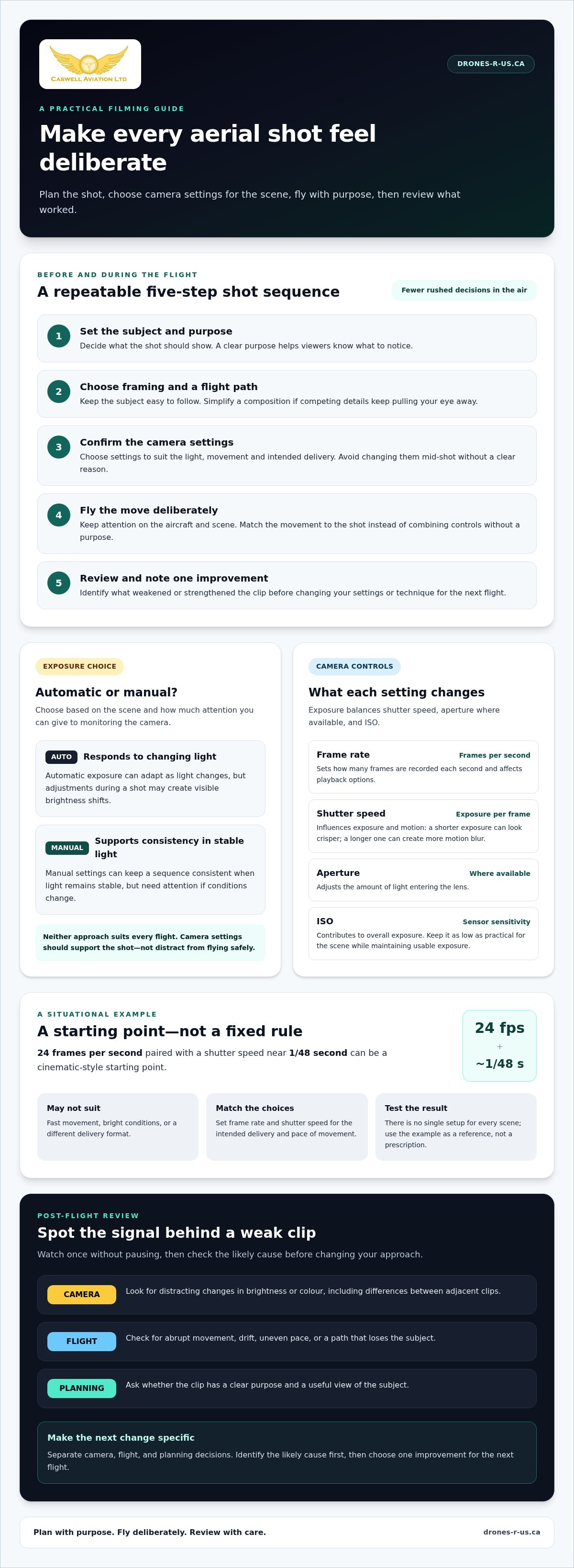
- Camera: Look for distracting changes in brightness or colour.
- Flight: Check for abrupt movement, drift or a path that loses the subject.
- Planning: Ask whether the clip has a clear purpose and a useful view of the subject.
Why a repeatable checklist improves filming
A short sequence reduces decisions made under pressure, especially when you’re managing the aircraft and camera at the same time. It also makes review more useful: a weak clip may be caused by camera settings, flight control or an unclear plan, and each calls for a different adjustment. Identify the likely cause before changing your technique.
Planned shots make aerial video more consistent by giving each movement and camera choice a clear purpose. Before filming, follow this order:
- Set the subject and purpose for the shot.
- Choose framing and a flight path that support that purpose.
- Confirm the camera settings you intend to use.
- Fly the move deliberately, keeping attention on the aircraft and scene.
- Review the clip and note what weakened or strengthened it.
This process doesn’t remove the need to adapt to conditions. It gives you a reliable starting point, so changes are intentional rather than rushed. As you work through the checklist, assess camera, flight and workflow decisions separately instead of treating every disappointing clip as an equipment problem.
Avoid exposure and camera-setting mistakes in drone videography
Exposure is the balance of shutter speed, aperture where available, and ISO. These controls determine how much light reaches the sensor and influence how motion appears. If a setting changes without a clear reason, footage can become too bright, too dark or inconsistent with the next clip. Camera settings should support the shot, not distract you from flying safely.
Automatic and manual control each have a place. Automatic exposure can respond to changing light, but adjustments during a shot may create visible brightness shifts. Manual settings can provide consistency when light remains stable, but need attention if conditions change. Neither approach suits every flight. Choose based on the scene, the movement and how much attention you can give to monitoring the camera.
What do frame rate and shutter speed change?
Frame rate is the number of frames recorded per second. Shutter speed affects how long each frame is exposed, influencing both exposure and the appearance of motion. A shorter exposure can make movement look crisper; a longer one can create more motion blur. Match both choices to the intended delivery and pace of movement, then test the result. There’s no single setup for every scene.
For example, 24 frames per second paired with a shutter speed near 1/48 second is a common cinematic-style starting point, not a universal rule. It may not suit fast movement, bright conditions or a different delivery format. Use the table to understand what each control does, not as a prescribed camera setup.
| Setting | Purpose | Situational example |
|---|---|---|
| Frame rate | Sets how many frames are recorded each second and affects playback options. | 24 fps for a cinematic-style sequence, if it suits the intended delivery. |
| Shutter speed | Controls exposure time per frame and influences how motion is rendered. | Near 1/48 second with 24 fps as a starting point, not a fixed requirement. |
| Aperture, where available | Adjusts the amount of light entering the lens. | Set according to the lens, light and desired exposure. |
| ISO | Adjusts sensor sensitivity and contributes to overall exposure. | Keep it as low as practical for the scene while maintaining usable exposure. |
When do ND filters help, and when can they hurt?
A neutral-density (ND) filter reduces the light entering the lens. In bright conditions, it can help manage exposure when you want to keep your chosen shutter speed and aperture. It won’t correct every exposure problem. A filter that’s too strong may leave the image underexposed if the light changes. Check exposure and colour on the live display before filming, and recheck if clouds, sun angle or direction of travel alter the light.
To avoid common drone videography mistakes in camera setup, decide what the clip needs, set the frame rate and exposure controls, then review a short test recording before committing to the full move. For structured support with camera decisions and piloting practice, explore drone training and aerial video services.
Prevent jerky movement and weak composition in aerial video
A smooth drone can still produce distracting footage if the pilot combines several control inputs without a clear plan. Moving forward while climbing, yawing and tilting the camera all at once gives the viewer several changes to follow. The result may feel busy, even if each movement is controlled. Start with one main movement and add another only if it helps explain the scene.
A useful camera move reveals information rather than adding motion alone. Before recording, decide what the viewer should discover: the shape of a site, its scale or its relationship to the surrounding landscape. That purpose helps determine the direction, speed and endpoint of the move.
Which drone movements are easiest to control?
Single-axis moves are a practical starting point because they limit the number of controls you’re managing at once. Practise the full movement before recording footage intended for delivery. Begin gradually, hold a steady pace and ease off the controls near the end. Gradual starts and stops help prevent abrupt-looking clips, while a planned endpoint gives the shot a clean finish.
- Slow reveal: Move from behind or beside a foreground feature to reveal the subject. It adds discovery, but the foreground can obscure the subject for too long if the reveal is poorly framed.
- Lateral move: Travel sideways to show how a subject relates to its surroundings. It can create parallax, where nearer and farther objects appear to shift at different rates, but distracting background details may pass through the frame.
- Rise: Climb to reveal more of the landscape or show the subject in context. It can communicate scale, but may reduce the subject’s prominence as more of the scene enters the frame.
Use one move at a time as your baseline. If you combine movements, rehearse the combination and check that the camera continues to serve the subject rather than compete with it.
How can framing create depth without distracting viewers?
Build a clear relationship between foreground, subject and background. A nearby tree or structure can suggest distance as the drone moves, while the subject remains the visual anchor. Keep the subject identifiable throughout the planned movement. If it disappears behind foreground objects or becomes too small to recognize, adjust the starting position, path or framing before recording.
Depth should guide attention, not overload the frame. Review the edges as well as the centre: a prominent object at the edge can pull focus away from the intended subject. Keep the horizon steady when the composition calls for it, and avoid camera tilts or horizon shifts that don’t contribute new information.
- Choose a main subject and keep it easy to identify.
- Use foreground and background to show distance or scale, not to crowd the frame.
- Make camera tilts and changes in framing purposeful rather than habitual.
Repeated framing is one of the common drone videography mistakes to avoid. Several clips of the same subject from nearly identical angles may add little variety. Give each take a distinct purpose, such as establishing the setting, revealing a feature or showing the subject in context. Creative teams such as Dark Falcon Productions emphasize that giving each angle a deliberate visual role prevents footage from feeling redundant. That way, movement and composition work together instead of producing motion for its own sake.
Use pre-flight and filming checklists to avoid errors
A repeatable preparation sequence helps keep filming decisions manageable and reduces the chance of overlooking a practical detail. In Canada, include current airspace and operating-rule checks in your plan. Requirements can depend on the operation, so consult up-to-date Canadian guidance rather than relying on memory or information for a different location.
What should a pilot check before recording?
Work through the checklist in order, from deciding what you need to capture to reviewing the first clip. Follow the aircraft manufacturer’s instructions when assessing aircraft readiness and operating conditions.
- Confirm the filming objective. Identify the intended subject and what the footage needs to communicate, such as showing a site’s layout or a particular feature.
- Review the planned location. Check current Canadian airspace information and the operating requirements that apply to the planned flight. The Canadian drone regulations guide can help organize this compliance review.
- Assess conditions. Consider weather and visibility in relation to the planned flight and the manufacturer’s operating instructions. If conditions don’t support a controlled operation, revise the plan.
- Check aircraft readiness. Inspect the aircraft and relevant equipment according to the manufacturer’s instructions. Confirm battery status and suitability for the planned filming instead of assuming a previous charge or inspection is sufficient.
- Set the shot plan. Choose the intended framing, movement and endpoint. A specific plan gives each take a purpose and helps prevent improvised manoeuvres.
- Capture a brief test clip. Review the first recording before continuing. Check that the subject is clear, exposure is usable and movement looks controlled.
How can a pilot keep each take deliberate?
A test clip is a practical checkpoint, not wasted time. It can reveal a framing issue or camera setting that’s easier to correct before capturing the planned sequence. Make adjustments while the aircraft is in a safe, controlled state, and keep your attention on the flight rather than diagnosing footage during a complex manoeuvre.
For each take, choose one planned movement and let it develop at a steady pace. Avoid adding direction changes simply because the aircraft is already moving. End with a controlled stop, then review whether the clip communicates its intended purpose. If the subject is obscured, the framing wanders or the movement feels unrelated to the objective, revise one element before the next take.
This process turns common drone videography mistakes to avoid into separate checks: preparation, compliance, aircraft readiness and filming execution. A written checklist can also reduce the number of decisions you need to hold in mind. For planned aerial capture, explore professional drone photography and video services.
Review drone footage systematically and choose the right next step
Review footage promptly, while you still remember the decisions behind each take. A quick, structured review helps separate a camera issue from a flight-control problem or framing choice. It also keeps a disappointing clip from becoming a vague instruction to “do better” next time.
What should pilots look for when reviewing footage?
Watch each clip from beginning to end, then check the details. Look at focus, exposure, movement and framing, including whether the shot has a usable start and finish. A clip may look acceptable in the middle but begin with a controller adjustment or end with an abrupt stop. Those moments can make it harder to use in an edit.
- Focus: Is the intended subject clear throughout the movement?
- Exposure and colour: Do they remain consistent, especially across clips intended for the same project?
- Movement and framing: Does the camera path feel intentional, and does the subject remain well placed?
- Clip boundaries: Are the beginning and ending controlled enough to use?
Mark takes that don’t work and record the likely cause. For example, write “subject left frame during lateral move” rather than “bad clip.” Then choose one specific improvement for the next flight, such as keeping the subject centred through the move. Changing one thing at a time makes it easier to see whether the adjustment helped. It’s a practical way to address common drone videography mistakes to avoid without overcorrecting your technique.
When can professional aerial video services help?
Self-review is valuable, but some projects call for planned capture and edited deliverables. Caswell Aviation Ltd offers basic photography and video media that is unedited, and advanced photography and video media that is edited. Both packages include up to one hour of on-site filming. The Basic package includes up to 30 unedited photos and up to 30 minutes of unedited video. The Advanced package includes up to 30 edited photos and up to 10 minutes of edited video.
These options differ in the media delivered, so consider whether your project needs unedited files or edited material. For more context on planning aerial footage for an organization, read this professional drone video guide.
Use your review notes to decide whether to practise a specific technique or bring in support for a planned project. Learn more about Caswell Aviation Ltd’s aerial video services.
Make your next flight a more deliberate one
Your next improvement doesn’t need to be a complete overhaul. Choose one point from your review, such as keeping the subject in frame or making the end of a move more controlled, and focus on it during your next practice flight. A small, specific adjustment is easier to assess than changing several techniques at once.
Common drone videography mistakes to avoid become easier to manage when each flight gives you one clear lesson. Keep a brief record of what you intended, what the footage showed and what you’ll try next. Those notes can help you make steadier choices with both the aircraft and camera.
Caswell Aviation Ltd provides photography and video services with nationwide coverage through affiliates, as well as drone training. Each deliberate flight is an opportunity to make your footage more useful and consistent.
Explore Caswell Aviation Ltd’s aerial photography and video services for support with your next project.
Frequently Asked Questions
Can I film drone video in automatic camera mode?
Yes. Automatic mode can be useful while you’re learning or when light changes quickly. One of the common drone videography mistakes to avoid is assuming automatic settings will keep every clip consistent. For a planned sequence, test manual control on a short practice clip and compare the results. The right approach depends on the conditions, your camera and your experience.
Do I need an ND filter for every drone video?
No. An ND filter is a tool for managing light, not a requirement for every flight. Whether it helps depends on the scene, camera and intended look. After fitting one, check exposure on the display rather than assuming the image is correctly exposed. One filter strength may not suit every scene, especially if the light could change. Follow the aircraft and filter manufacturers’ instructions when using equipment.
Is 4K always better for drone videography?
Not necessarily. Higher resolution can capture more detail, but the useful setting depends on the delivery format, editing workflow, available storage and camera capabilities. If the finished video will be viewed on a smaller screen, higher resolution may not add noticeable value. Choose settings that meet the project’s needs, then test a sample through your editing and playback process. Composition, exposure and controlled movement still shape the result.
Can I fly a drone in rain to capture video?
Don’t assume your drone is suitable for rain or wet conditions. Read the aircraft manufacturer’s operating instructions and assess visibility and flight conditions before deciding. If the equipment isn’t approved for those conditions, don’t fly in them. Rain can also make it harder to assess the scene, so consider whether you can operate safely. Consult current Canadian operating guidance for requirements relevant to your planned flight.
Can I film people or private property with a drone in Canada?
It depends on the location, operation, privacy considerations and applicable rules. A clear camera view doesn’t automatically mean filming is appropriate. Consider who may be captured, whether their presence is necessary for the shot and how the footage will be used or shared. Before filming, review current Canadian requirements and the Canadian drone regulations guide for flight-rule context. This isn’t a blanket legal answer.
How much drone footage should I capture for a project?
There’s no single amount that suits every project. Start with the intended use and list the distinct shots needed, such as an establishing view and a closer view of a key feature. Review each take before recording alternatives. Capture another version only if it offers a useful difference in framing or movement. Extra footage doesn’t automatically improve coverage, and it can make selecting and organizing clips less efficient. Experienced video production teams like SN Media Services LLC emphasize that working with a structured shot list ensures each take serves the final cut without burdening post-production.
Leave a comment